Sunday, 10 April 2016

My Second Project Prompter from "Artistic Expressions"

I found a spinner board from a dollar store bingo game and thought "Bingo!".  How cool a way to prompt myself when I am on a missing mojo day?  I added some of the printed prompts I used from my Art Folder Prompt using "Artistic Expressions" and that gorgeous paper with a repainted spinner.  Now I have it hanging by my table so I can give it a spin and same rules as the art folder I must follow the prompt!


I layered one of the blue flowers with pop dots and curled the edges, adding seed beads for the center and some accents.  It is fun looking and those colors are just so yummy!

Please check out this marvelous kit at the Dragons Lair Store and our April Challenge began yesterday with the theme "Anything Goes" so easy!  Come play with us and visit our Fan Page and LIKE us so you can play our games and challenges there, too, for prizes or loyalty points that can be cashed in when you have enough to spend in the store!  All of our links are listed below!

Dragons Lair Designs Sunday Showcase


The rules are simple! 

1. Leave a link to a recent Dragons Lair Creation (not a repeat and new within the last two months) that you have created using any of Janette's products, in the Linky below.

2. Creations should be made up mostly with Janette's products.

3. Make sure you complete all fields in linky so we can reach you in the
 event that you win.

4. All entries are due by midnight GMT on Friday.

5. Only one entry per person.

All entries will be put into a random list generator and one person will win
a product of their choice from Dragons Lair Designs store!


Check out the NEW £1 Quick Page Templates ( with a twist) in Store


We can't wait to see your projects !
Ok that all said here is your Sunday Showcase Freebie.

http://jmp.sh/v/7EEpYOHYACZKaHIGElbB

As always here is the Teams Inspiration.


Nan


Jacqui


Gwyneth


See you next week :)

Dragons Lair Designs Links: 


Saturday, 9 April 2016

A Quick Digital Scrapbook Layout - Y Wal

Hi Everybody!
Thank You For Popping Over To Have A Look At Our Blog
As A Design Team We Are Always Happy To Have Visitors To Our Dragons Lair Designs Inspiration Blog, And Especially Happy When We Are Left Comments


Today I've got a quick digital scrapbook layout to show you.
It's made using one of my photos and an assortment of items from the new Artistic Expressions collection that launched in the Dragons Lair Designs store on the 1st.
"Y Wal" is Welsh for "The Wall".  It's a section of the wal in our front passage that we hung a piece of wall paper from the top to the bottom and allowed my niece and nephews to stick their creations to, whether made here or brought home from school for us to keep.

Here's a closer look for you.


These are what I used:

Stamping Dragon Designs Item:
Items from the "Artistic Expressions" collection available - here - in the store.
Equipment:
My Craft Studio Software; IrfanView Software
Method:
I simply took a copy of the photo, together with an assortment of items from the Artistic Expressions collection, into My Craft Studio.  I chose a square item and made it fill the width of my working area so that my finished layout would be square, and worked on that area building up my layout.  After saving it as a .jpg I took it into IrfanView to crop, re-size, and add my digital watermark (I've got it set up in that software for when I adjust and watermark photos I've taken, so easier to work than re-set one up in My Craft Studio).

And that's it.  One Quick Layout.  Although I will print it out as my mother likes to keep a collection of printouts of the layouts I've made.

-oOo-
And that is it from me for today.
Please keep coming back regularly to look at new posts as, over the next few weeks, you'll find various "Inspiration by ..." posts appear on this "Dragons Lair Designs Inspiraiton Blog", as well as other posts by different Guest Design Team members.  I'll be back with more posts over the coming months as well, so keep an eye out for those.

You might also like to sign up for the Dragons Lair Designs Newsletter - Here! - where you can have news about new collections, etc., sent straight to your E-mail box (there are even newsletter freebies to be had.)

Stamping Dragon Designs Links
  • If you fancy trying out some of Dragons Lair Designs, please do visit the Store to find all sorts of digital goodies (you'll find great digi-stamps and lots more).
  • We are also on Etsy, so you can pop along - here - to find some Dragons Lair Designs digital downloads.
  • And why not join the "Dragons Lair Designs Fan Group" Facebook group. It's a small, fun, group where we have lots of different activities which include exclusive challenges, daily inspiration and giveaways - and there's a loyalty club for those who take part as well.
  • "Like" Us on Facebook
  • Dragons Lair Designs Challenge Blog : new challenge 1st Friday every month
  • Follow designer Janette Padley on Pinterest!
  • See us on CraftsUPrint
  • Dragons Lair Designs Crafts Group - selling buttons and bits and bobs

Till next time - Have Fun Crafting!
Dragons Lair Designs Inspiration Blog Design Team Leader
(And if you are wondering "who's Gwyneth?" - then you'll find an "About Me and My Blog!" piece on my blog.)

Friday, 8 April 2016

Dragons Lair Designs Guest DT - Marleen Gallagher

This month we have Marleen back as a Guest Digital Designer, who played with the kit Artistic Expressions for your inspiration, 
She has made four cards with the collection, here are two you will have to wait for the others :D

You can pop on over and Visit Marleen HERE


Dragons Lair Designs Links:

Wednesday, 6 April 2016

Artistic Expressions Digital Layouts from Janette

I so enjoyed using the new kit Artistic Expressions, now available over at Dragons Lair Designs, there are so many layouts, cards,Albums to be made from it :D

You can find it on store HERE you can also grab a Freebie here on the blog, we didnt stop there though oh no, if you want to grab a lovely matching cluster pop on over and join our Facebook Fan Group for the exclusive freebie.

The layouts i created are both of my Daughter back in 2011.


Dragons Lair Designs Links:

Tuesday, 5 April 2016

Lynne - Using flowers from the new Artistic Expressions

Lynne Using flowers

from Artistic Expressions.
 Just couldn't
resist making a box of beautiful flowers from the collection.
The box is:
20.5cm x 14cm -
score at 5cm/10cm/15cm/20cm along long edge,
turn sore at 7cm up to 15cm mark.
Cut tab off of top of 0.5c.
Fold cut up to 7cm line at 5cm/10cm/15cm.
Attach background papers to folded down pieces and base of box.
Glue tab to make box.
Cut out flowers and leaves using perspex to get different heights.
Glue 2 strips of card inside box to attach perspex and
decorations to.


Here are some links to the Dragons Lair Designs family of sites you might like to check out:


Follow on - Artistic Expressions

Following on from the launch of the new collection - 

Artistic expressions made by

Lynne

From the mini kit I chose to
make a clutch purse.
Firstly a sheet of cardstock 28cm x 28cm,
score at 7cm each side,
alt.sides score at 10cm,
fold along score lines,
fold and score in corners,
glue to make shape.
Cut 2 pieces background paper 
9.5cm x 13cm for front and back,
make flap with background paper,
decorate with flower elements.

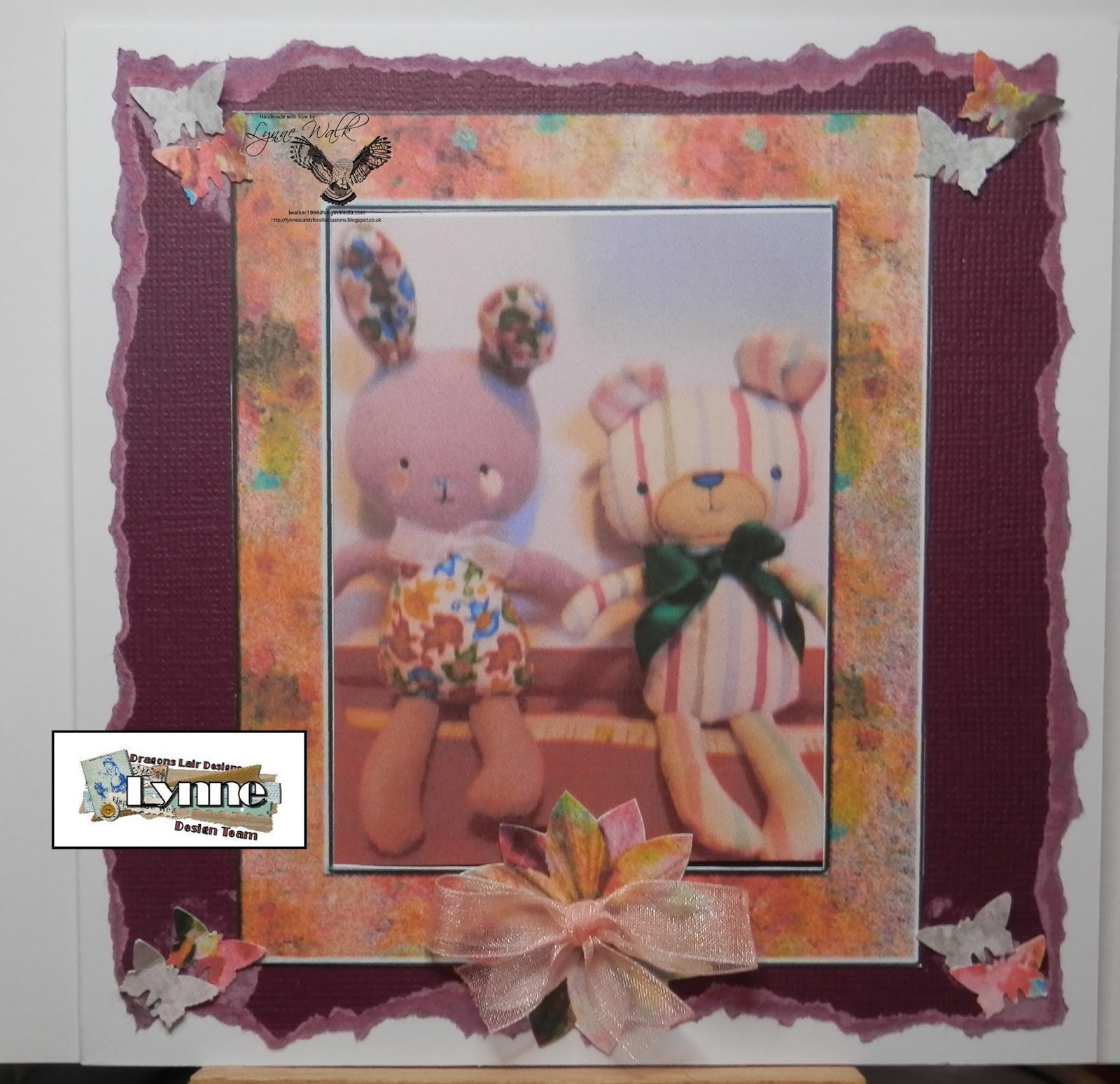
Another way of using Artistic Expressions is
using the frame. I put a photo of my
easter bunny and teddy in,
embelished with butterflies cut from
background paper,
and finished with floweer and ribbon bow.


Here are some links to the Dragons Lair Designs family of sites you might like to check out:

LinkWithin

Related Posts with Thumbnails